Polyurethane Experiments

Sector67 was privileged to receive six barrels of two part polyurethane scrap resin from Isthmus Engineering (that’s 330 gallons for anyone counting, or about ~2871 lbs).  We’re very happy we turned down the remaining 20 barrels, as we still have 5.95 barrels left. Although the material is technically expired and moisture sensitive, it’s still able to cure correctly as long as it isn’t left to open air for more than a few weeks – even then it fortunately still cures, just with a few extra bubbles.

Lots of necessary dispensing and disposable handling equipment:

We initially had a lot of trouble figuring out an appropriate process to pouring and curing it bubble free as well as an appropriate mold material. Early on we determined that particle board and other woods didn’t work well, the polyurethane reacted vigorously with any moisture in the lumber and was an extremely strong adhesive to wood, even with various release agents and finishes.

Eventually we used wood-polyurethane to seal the moisture in the wood, and then added our two part polyurethane on top to give a thick coating, but it still wasn’t a solution for a mold, just for coating wood parts.  One of the largest strategies is mixing the polyurethane up, putting it in a temporary container and drawing a strong vacuum until it stops growing from the released air, and then pouring a beautiful bubble free part.  If you don’t vacuum pump the mixed materials, it makes an ugly bubble-filled part.

We quickly settled on two part flexible silicon rubber as a successful mold material, but this silicon is very costly and it doesn’t hold up well to repeated pours as it deteriorates after every part removal.  (silicon mold at left, polyurethane tank tread sections at right)

We were also able to pick up very detailed objects with a silicon mold:

Eventually, we arrived at Mann-Release combined with various plastics as a suitable mold making technique for round objects.  What might we be building out of round slugs of polyurethane you ask?  How about a giant Lite-Brite?

The polyurethane has been used around the shop as a go-to item for anything needing to be stuck down, sealed up, or generally made sticky (oops, too little hardener huh. . .)

Fixing a shattered plastic bicycle rim:

Contributing to a winning 100 Hour challenge entry:

(Absolutely nothing sticks to borosilicate lab glass, except our trusty polyurethane)  The project was eventually appropriately named the “Polymaster” and went on to win the most creative entry in the UW student competition and $300 for the creating team.

Snowboarding slider box first go didn’t work so well:

We’ve also stumbled on a creative strategy for lost foam polyurethane molding, by hot gluing together lots of foam chunks you can create very complex foam molds, pour polyurethane around them, and then dissolve out the foam with a solvent:

The latest experiments have centered around using heavy weight oil as a plasticizer, which prevents the polyurethane from fully hardening:

And toying with adding various materials, it’s pretty common to add fiberglass fill to polyurethane, but adding pet shavings can yield unexpectedly strong, lightweight parts because of the foaming reaction to the wood:

Vacuum pumping the polyurethane and carefully coating pink construction foam yields an extremely strong airplane wing that’s able to be bent well past the breaking point of uncoated foam:

We’ve also been very successful at carefully metering water into the mixed polyurethane to yield high density foam:

A City of Madison BLINK Art Grant was fullfilled by Sector67 member Tim Sprengelmeyer of Midwest Recycled Art, creating a large turtle that’s currently in Orton Park.  Tim didn’t want his turtle to rust while out in the weather, so it was suitably coated with dyed polyurethane:

A little testing was done before deploying the polyurethane on the turtle, yielding very good anti-rust properties (half coated):

Our recently christened vacuum former makes nice negatives to pour into, and when properly coated with Mann Release we’re able to remove the polyurethane from the styrene plastic:

You can see in this mold that it’s not the standard yellow, as we’ve been experimenting with polyester and other solid particle dyes, yielding very interesting wavelength absorption and transmission characteristics.  In this case, a change from aquamarine to red:

There’s always the old stand-by table by submerging interesting things in polyurethane.  In this case, we’ve finally found an off the shelf product that it won’t stick to – freezer paper!  It usually releases cleanly with no residue (without a mold release), and it’s cheap.

Of course when you’re done pouring, but have a little left over and your now very sticky gloves, what more to do than to make an extra hand to lend around the shop:

Yes, this stuff even bonds to nitrile, latex, vinyl, and any other glove materials we’ve tried. . .  It’s really really sticky stuff.

Posted in Hardware Tagged with: , , ,

Mail Art Guild of the Madison Area Meetings

Sector67 is happy to host the Mail Art Guild of the Madison Area (MAGMA67!) with monthly meetings at Sector67.

MAGMA is way to make and share art and support the postal service at the same time. For more information on mail art check out the excellent Wikipedia article.

What they do:

Mail art:

You can send mail art to anyone on the MAGMA67 contact list.

Share online:

You can upload pictures of your art or of art that you have received at our group yahoo website. Join the group to look through their online albums at mail that has already been shared for fun and inspiration. Our website also has a calendar, resource sharing file and the contact list. You do not have to live in the Madison area to join but you must be a member to access the site.

Meet monthly:

Once a month they meet to create art that is intended to go through the mail. Typical agenda: 15 minutes to deal with any business. Lots of time to make art together. 15 minutes of show and tell at the end. Photographing of work throughout if someone remembers to bring a camera. This agenda is subject to change if there are specific topics that we want to work on together. Meetings are two hours long. Members help clean up at the end.

Scheduled meetings:

March 20, 12 – 2PM
April 17, 5 – 7PM
May 15, 12 – 2PM
June 19, 5 – 7PM

Posted in Uncategorized

Apollo67 v1 Recovered

Sector67 competed in the Hackerspaces in Space competition earlier this year. We launched two balloons lofted by hydrogen and posted details at Apollo67. The first balloon launched was a green dart whose objective was to return to earth as fast as possible (points scored based on launch to recovery time). Unfortunately weather conditions on the day of the launch were unfavorable, and the payload was never recovered or heard from again. . . . until now!

The remains of the payload were found in Grand Haven, Michigan in early February and mailed back to us today. We were able to recover all of the still images and video from the flight as well as GPS and altitude data from a custom Android application. Amazingly, after a through cleaning of the phone with alcohol it came alive today (despite drifting across and living in a lake for several months) and we were able to fully recover all information from the SD card and onboard memory. The phone was in perfect condition until the screen was cracked in an unfortunate fall during cleaning! The battery still works 😉

Here’s an animation of the altitude and position data:

Prepping for Launch:

Launch Video:


It’s believed that the battery died when it hit peak altitude (17,913 meters or almost 59,000 feet)

You can see a glance at the horizon in this video:

Posted in News, Projects

Windchime from Sector67 Scrap

Danny Spitzberg put together a cool windchime using only scrap materials from the wood pile and metal bin:

Posted in Projects

Iron Pour a Success!

The Iron Pour co-hosted with FeLion Studios was a great success!  A hundred plus people made it through our shop and had a great time watching the iron pour despite the bitter cold.  No injuries to report either despite melting almost half a ton of cast iron with a cupolette furnace that sounded more like a jet engine.

Lots of great pictures and videos, here’s more than a few links:

Markus:
Pics: https://picasaweb.google.com/112341170605872744137/20120211PourNYerHeartOutValentineSIronPourStills#

Larry:
Pics: http://tinyurl.com/felionpour

Joe:
600fps Slowmo: http://www.youtube.com/user/HighSpeedSlowMotion/videos

Pics: https://picasaweb.google.com/100855345129488501027/IronPourSector67February112012

Posted in News

2012 UW OCR 100 Hour Challenge

[Logo] Wiscontrepreneur: A Program of the UW–Madison Office of Corporate Relations

We’re again excited and ready to support the UW Office of Corporate Relations in another great 100 Hour Challenge.  UW System students are invited to Sector67 for an opportunity to create treasure from state surplus trash with only 100 hours to complete the project and post materials online.  For more information, check out the 100 Hour Challenge website FAQs and peruse past winners for ideas.

Picture

Posted in News Tagged with: , ,

FIRST LEGO Robotics Team Splatacrash Finds a Home at Sector67

Last fall Sector67 agreed to host a FIRST LEGO League robotics team. Team Splatacrash consisted of eight intrepid O’Keeffe Middle School students with a penchant for mechanical design and programming. Sector67 director Chris Meyer provided the team with an inspiring location that included space for team meetings, LEGO robot design, construction, and programming as well as project research and prototype development. As a bonus, the team members received insightful engineering advice from Chris and other Sector67 members throughout the fast and furious 12 week competition season.

During that time, team Splatacrash designed and built a compact LEGO robot complete with motors, sensors, and a microcontroller that they programmed to guide the robot as it journeyed out onto an obstacle-filled 4’ x 8’ field to perform a series of missions. The goal was to accomplish as many of the pre-defined object manipulation missions as possible in two and half minutes. The robots had to maneuver around a field filled with LEGO objects and structures, earning points by collecting and bringing objects back to base, triggering LEGO devices while avoiding obstacles.

Team Splatacrash develops presentation materials at Sector67. The LEGO robotics field is visible in the background.

In addition to the LEGO robotics portion, the team was tasked with a significant research project. This year’s theme “Food Factor” required the team to investigate food safety issues, select a food contamination problem to focus on and then to devise an innovative solution to address the problem. After several scientific experiments, interviews with local experts and a school-wide survey the team determined that the lack of hand washing before the school lunch period was a significant source of food contamination. Their innovative solution? The Germs-B-Gone! The prototype device developed at Sector67 is designed to be wall-mounted at the entrances of school cafeterias, providing a simple and quick way for students to sanitize their hands before eating lunch. Their work on this project earned Splatacrash the Research Award at the Wisconsin State Championship in mid-December.

Germs-B-Gone prototype hand sanitizing station

FIRST LEGO League is an international robotics program designed to encourage interest in science and technology for kids ages 9 to 14. Teams compete in tournaments which include a robot competition, a research project presentation and judging of the team’s technical knowledge, robot design and teamwork skills. The Madison program and regional tournament is run by BadgerB.O.T.S. out of Memorial High School.

For more information, visit www.badgerbots.org or www.usfirst.org/roboticsprograms/fll/

Team Splatacrash tests their robot in the “pits” at the WI state FLL Championship.

Posted in News Tagged with: , , , ,

Cast Iron Pour 1PM-5:30PM Saturday

Sector67 is hosting FeLion Studios for an iron pour at Sector67 on Saturday, February 11th. This is a public / family event , and we have some very awesome deals to offer you over the next 6 days before the melt down.  Show up BEFORE 1PM if you have something you’d like to cast, show up AFTER 1PM to watch the fire show known as cast iron foundry work!

In the spirit of this 3rd Annual “Pour’n Yer Heart Out” Valentines’ time iron pour, we are making/selling heart-shaped sand moulds for anyone passionate enough to hack their favorite design/person’s name/ picture/word/pattern into a heart-shaped sand mould and watch it get cast in iron at this event.

Pre-sale hearts are NOW AVAILABLE at Sector67!

For a mere $20, you get 2 hearts to go to town on, and the position to work on it at your own pace/ on your own time from this point till the pour.
This offer is LIMITED, – you basically have 6 days ,… no pressure 😉

For all you last minute folks on the fence about making a heart , you’ll still have a chance to carve something, should you choose to participate, on the day of the event. But the mould prices go back to the regular $30 price tag, plus you get less time to really lay your heart out …

There are 10 numbered heart moulds at Sector67 now, and a “Heart-a-Track” sheet for you to sign your name and report which number heart mould you recieved. There is a place on this sheet to also jot down what your design might be, so we can keep track after the pour in case there’s any straggling hearts left on the pour floor…

Event will also feature live DJ and have shirts, stickers, food, and fine beverages available!

For some fun carving tips on making your Valentine, plus more about FeLion Studios, check out the official site.

Posted in Hardware Tagged with: ,

Experience Making PCBs from Fritzing

With some help from Chris and Sector67, I’ve been able to work out a process for getting to a custom-fabricated printed-circuit board (PCB) that’s amazingly simple and straight-forward, even for people who aren’t “hardware guys”. This article gives an over-view of how and why you might want to use at least part of this process…

My background is 30-odd years in software engineering. From the time I was in high school (and managed to sneak out of the college-prep track long enough to take an electronics class or two with the “shop kids”), I’d struggled to learn electronic design and troubleshooting, mostly to no avail. It always felt like one of those “there’s two kinds of people in this world” issues: my brain seemed wired to “get” software, but not hardware. Oh, I picked up enough to do simple projects and basic Ohms-Law stuff, but just barely.

So when I joined Sector67 a year or so ago, I homed in on Arduino and Electronics 101 classes. You may have seen me present at a monthly meeting on my automatic chicken-door (http://www.sector67.org/forum/viewtopic.php?f=10&t=85) or my RF remote appliance controller http://www.sector67.org/forum/viewtopic.php?f=10&t=129.

I decided a couple of months ago to run with the RF remote control project as a test-bed to try to learn how to lay out a custom PCB and have it manufactured. I had tried taking Chris’s class in EagleCAD and had found the interface to be pretty annoying and difficult. Chris had suggested looking at another tool, called Fritzing, but it took me a couple of months and seeing a couple of articles online about it before I finally downloaded the (free) software and tried it out: Bingo!

Fritzing is a very easy to use tool that let’s you capture (or design up-front) a breadboard circuit. With a breadboard, you just stick jumpers in holes to make connections; no soldering needed, easy to make changes until you get it working right. Fritzing lets you just drag wires into place with your mouse, on a graphic display that looks just like your breadboard:

fritz_bb.jpg


bb.jpg

[I actually used two different Arduinos during this project: the Boarduino version is very handy for breadboard work, as it plugs right into a breadboard for quick & easy prototyping. For the actual PCB, I wanted to make an Arduino shield, so in Fritzing I used a standard Arduino Uno. Plus, Fritzing doesn’t have a predefined part definition for the Boarduino…]

perf.jpg

[I also made a perf-board version of this circuit. I’ve called perf-boards “needle-point with a soldering iron”, and building this one convinced me I just had to learn to make PCBs!]

Fritzing includes predefined parts definitions for hundreds of common parts, including multiple Arduino versions and most of the parts in the the Sparkfun catalog. It also provides a “mystery” chip feature (the black box with the question-mark above) that lets you define the number and names of an arbitrary set of pins.

I was overjoyed to even get this far: just using Fritzing to document a breadboard design is incredibly valuable. I had been struggling to find some easy way to capture and document projects; Fritzing meets that need beautifully, even if you never need the schematic or board-layout features.

But that’s where the magic of Fritzing comes in: once you’ve drawn your breadboard design, a click of a button switches to a schematic view:

fritz_sc.jpg

Since I tend to not use the schematic view at all (personal preference), this schematic is a default, non-prettified view. You can easily drag the chips around and reposition the wires to “look nice”, if you care to…

The final view in Fritzing is the PCB view, which makes the schematic/breadboard design into actual traces on a circuit board:

fritz_pcb.jpg

This shows my final design, omitting some intermediate steps. Fritzing has an “auto-route” feature that tries to lay out all the traces on the board so that they don’t overlap each other, using a double-sided board design if you need it (as this one did). Most likely it will fail to find a workable route for a few of the connections, but easily allows you to manually shift things around until you get a workable design. It can feel kind of like doing Rubic’s Cube at first, but with a little practice it isn’t too hard, at least for relatively simple circuits. Plus, Fritzing has a “check design rules” feature that validates nothing’s crossed and things are far enough apart to actually build and function properly.

Once you have a PCB laid out, you can export it as “Gerber files”, an industry-standard format for specifying how to build a PCB. There are several companies online that will accept these files, build some finished PCBs, and mail them back to you.

I identified two leading vendors: one in Germany (http://fab.fritzing.org/fritzing-fab) would make me one (1) PCB for 28 Euros. The other in China (http://iteadstudio.com/) would make me ten (10) PCBs for $26. I couldn’t convince myself to spend more money for 10% as many boards, so I emailed my Gerber files off to China on New Years morning. And 22 days later, the mailman had me sign for a small box of PCBs.

I promptly ran over to Sector67 and started soldering parts onto the board. I plugged it on top of my Arduino, downloaded the application code that I had written and tested using the breadboard circuit, and WOW: it worked first try!

pcb.jpg

Once I recovered from the shock of “worked first try”, I quickly realized that this was a Big Thing: even a software guy can make inexpensive custom PCBs almost painlessly, using a free, user-friendly open-source tool. As soon as Chris saw how excited I was, he told me I needed to write it up for S67. So here it is…

Posted in Arduino, Hardware Tagged with: , , , , , , ,

Thermal Camera and Firewood Rack

Thermal Camera

This is a thermal camera project that was designed from www.cheap-thermocam.tk and www.centralnexus.com/thermal/

Thermal cameras normally cost $5,000 or more. They use an array of sensors to make an image. This thermal camera costs a lot less by using one sensor and sweeping it over an area using servo motors. The data is then aggregated by a computer to make the image. The first image produced by this thermal camera is measuring the temperature difference of a soldering iron. The pictures are not aligned in the image because the camera is not yet calibrated.

Firewood Rack

This is a firewood rack that was inspired by AK47 studio. It is a Christmas present for my brother.

It uses a minimal amount of material and utilizes space efficiently to store firewood. It is a dynamic sculpture. As the round rods bend and flex under the load of the stored wood, it gives a sense of continual change. The round rods are gently splayed giving a sense of ever expanding possibilities.

Luckily, he liked how it turned out. Here it is in its final resting place at my brother’s house.

Thanks to all the members of Sector67 whose assistance made these projects possible.

Chris Petit is a member of Sector67 and the owner of the local design firm Regenerative Design, LLC. Website is www.regenerativedesign.com.

Posted in Hardware Tagged with: ,

Japanese Ice Sphere Mold

A few months ago, I found a video of an awesome “Japanese Ice Mold” online. The idea is simple:

  • People like drinks cold.
  • Ice makes things cold.
  • Ice melts.
  • People don’t like water in their drinks.
  • To prevent melting, you should have the maximum volume (making things cold) with the minimum surface area (melting).
  • The shape that does this is called a sphere.
  • It’s hard to take water and make spheres that don’t have ugly seams in them.
  • Through the magic of thermodynamics, you can use a metal to melt some parts of a block of ice, while freezing the resulting water, and get a beautiful sphere.

At this last bit, the physics student in me is screaming “but that makes no sense!” Admittedly, I didn’t do very well in physics, so it wasn’t screaming very loudly. I really thought that my brother, Quinlan (who’s a liquor snob and has more parties than I) needed this for a party. However, the fact that it costs freaking $1400 put it well out of my range; Quinlan didn’t need it that badly. As I looked at it, though, I realized that it wasn’t a hard concept: just get a big block of aluminum with a spherical hole, heat it, and you’re done. Surely, I could make this. If only I was a member of a hackerspace with milling tools… but wait! I am!

For more, check out Making the Mold at Times and Measures.

Posted in Hardware Tagged with: , , , ,

A Kalahari Christmas

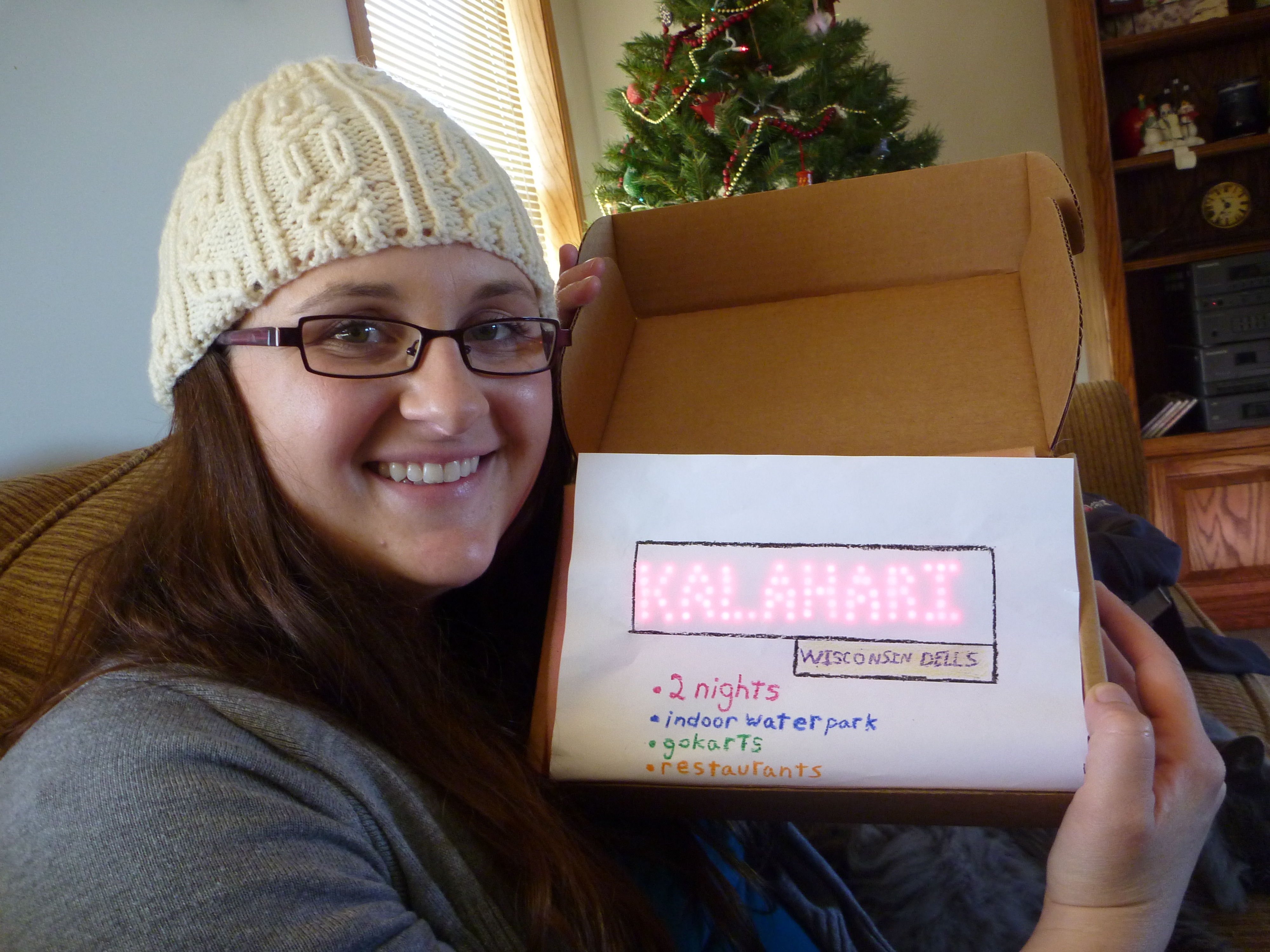
After Erin took me on a ski trip to Salt Lake City for Christmas 2010, I was far behind in the Christmas Karma. For 2011 I planned to take her to a resort in Wisconsin Dells, which is sort of like the Las Vegas of Wisconsin, except with water parks instead of casinos.  Of the many resorts, I decided on Kalahari based on recommendations of others and some research on the web. But just telling her wasn’t a great way to do the presentation. I wanted her to unwrap something.

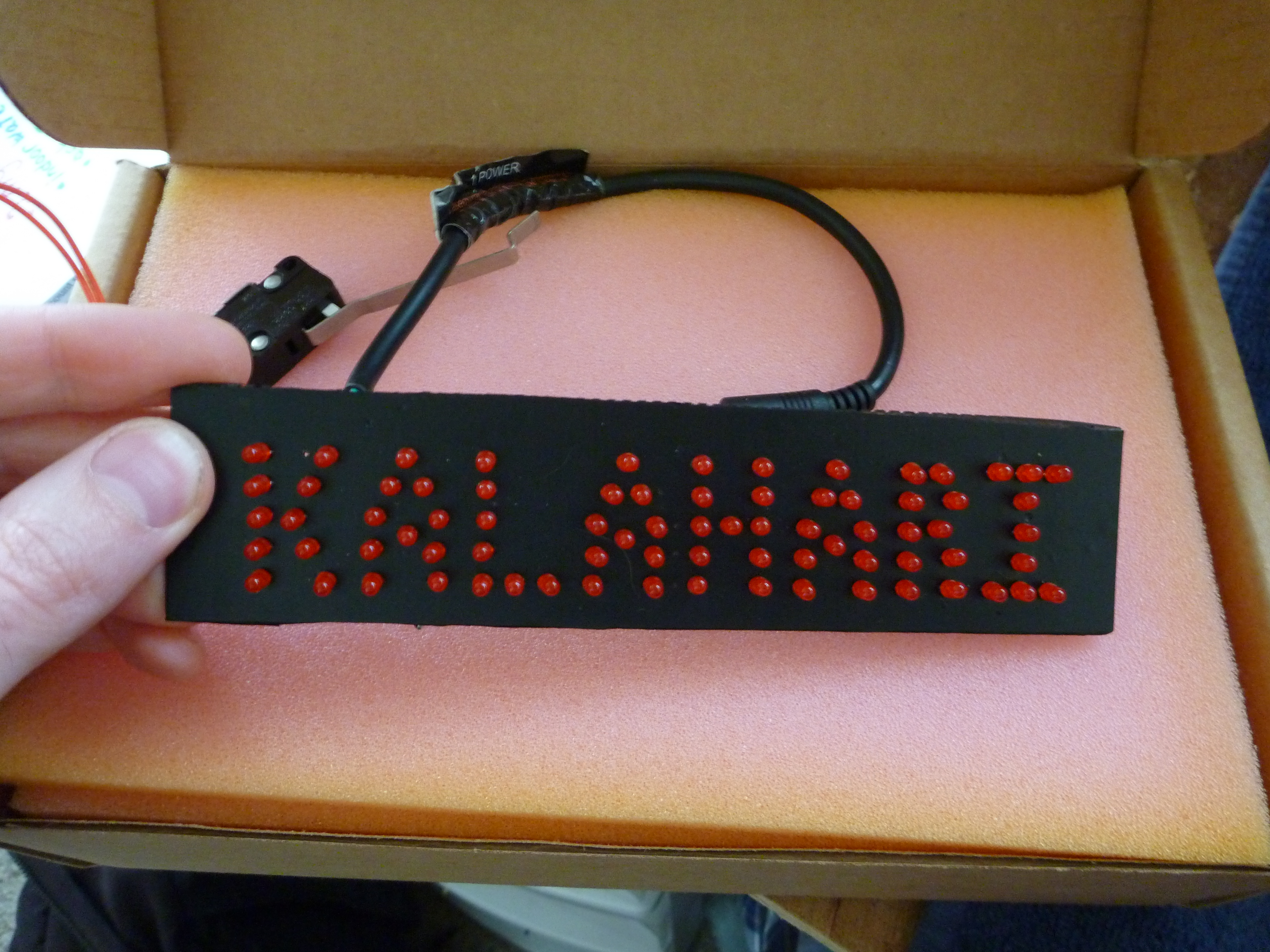
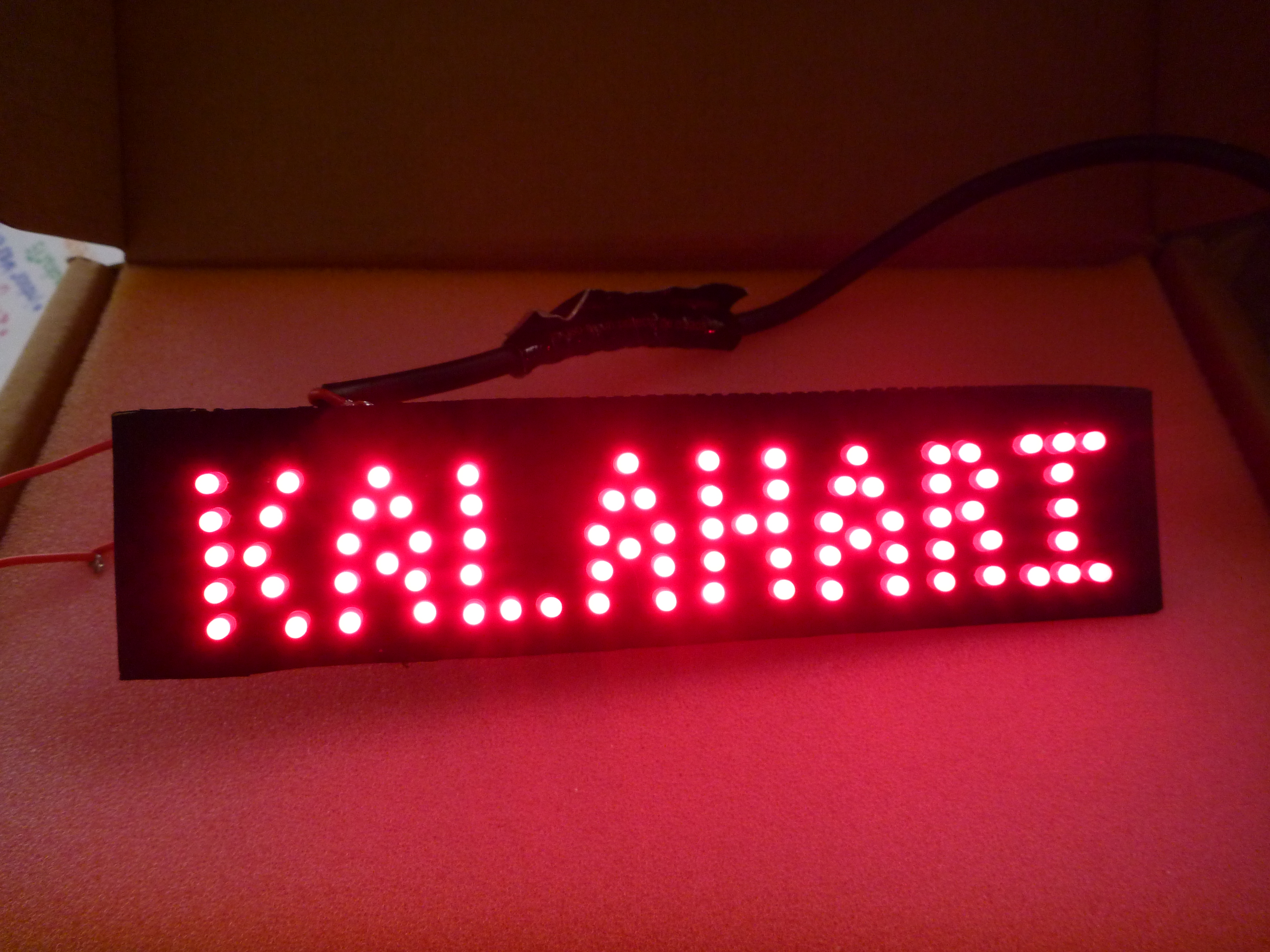
I’ve been working for a while on a portable electronic scoreboard, so I had all the materials to make a good LED sign with the name. The day before we were to leave for Kansas, I started the project. The idea was to make a big LED sign that said Kalahari on it. It would be battery powered, and a switch would turn it on when the box was opened so that it wasn’t on the entire time and running out of battery. That was as far as I got in planning before I started building.

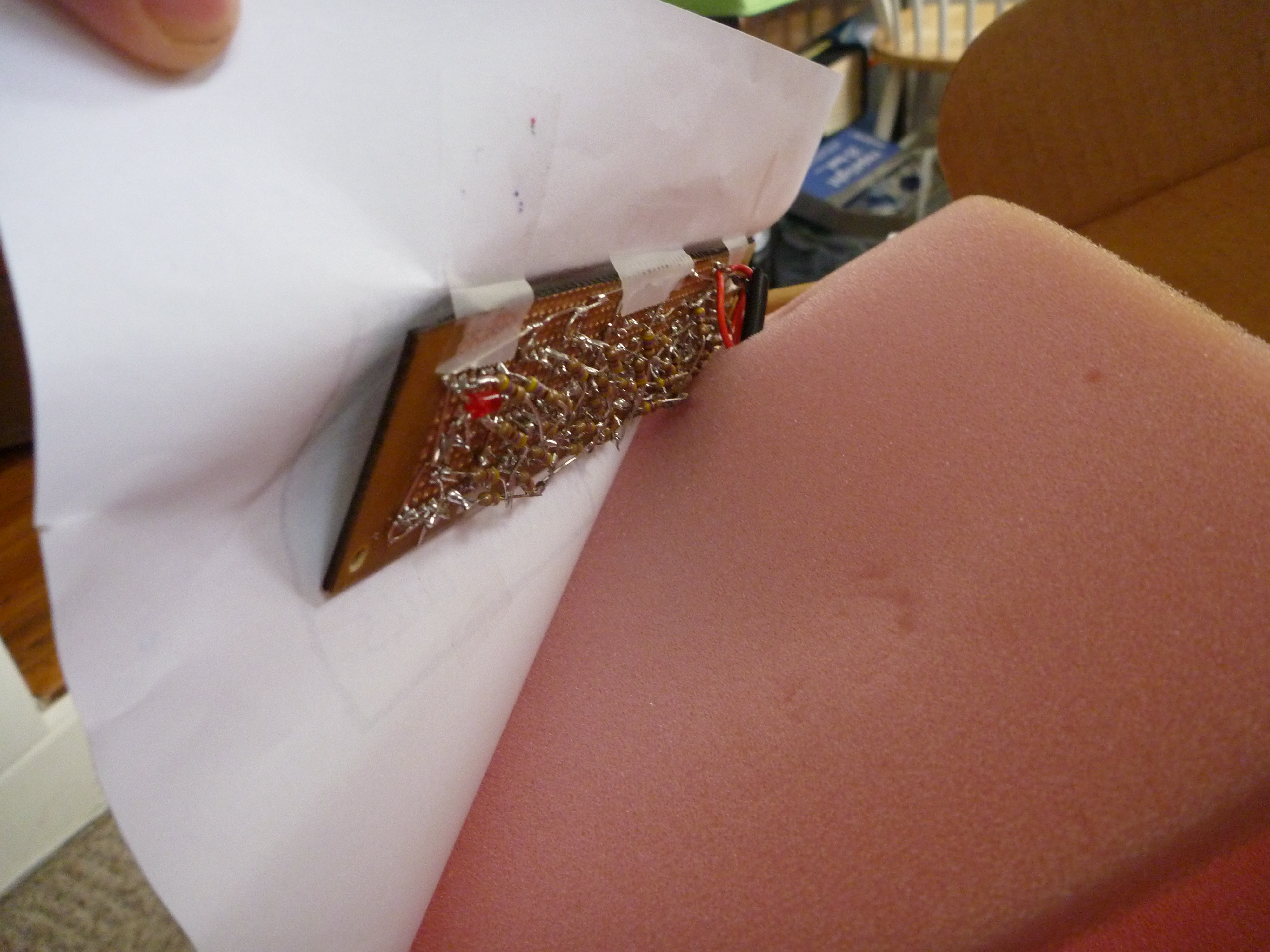
I borrowed a rechargeable battery from Sector67 to use as the power supply, then laid out the LEDs on a prototyping perf board covered with sticky black nylon paper. It took a couple tries to get it all to fit on the available board with legible letters and decent spacing. Then I found a switch that would work. The circuit was simple. The switch connected the + voltage to the board and the ground went directly to the board. The LEDs were connected with a resistor and two LEDs in series, and all those strings were in parallel. This meant a huge current drain, but I was limited to a power supply with only 6 volts, so I didn’t have much choice. This also meant a LOT of soldering and a lot of current limiting resistors. There was an odd number of LEDs, so I put an extra one on the back side so that the circuits were all the same.

With all these LEDs packed into a small space, it was very bright, so I struggled with a few different ways to do the presentation. I ended up taping the board behind a piece of paper so that the paper would diffuse the light a little. It ended up working great. The paper covered everything, including the switch. When the box was closed it was off, and when it was opened the switch was triggered, turning on the sign.

The girlfriend was happy, so the project was a success.

The next time I do something like this I’ll use less LEDs and instead of doing a sign of LEDs I think it would be better to have a piece that had letters cut out and was backlit by only a few LEDs. I also would have spent a lot more time on what was surrounding the sign. Using regular paper and crayon to draw was the best I could do with the limited time and resources I had, but it wasn’t enough for me. Construction took far longer than I expected, and I was a little disappointed with the results. I was working late into the night to solder it all together, and I barely had any time to work on the rest of the package. I can do better.

Check out my website for more projects.

Posted in Hardware

Cart


Upcoming Classes:
Adding with Electricity